---
title: "Company Settings: Financial Defaults"
description: Your financials page is where you will set up your default payment schedule, currency, payment settings, and more. Once your defaults are set, it is automatic for every event! Make sure you save your settings!
---
[Skip to content](https://support.detailsflowers.com/en/how-do-i-set-up-my-default-financial-settings#main-content)

- Details University
Show submenu for Details University
- [Video Tutorials](https://info.detailsflowers.com/video-tutorials)
- [15-Minute Meeting](https://meetings.hubspot.com/details-flowers/meet-with-details-support-free)
- [Details Check-In](https://meetings.hubspot.com/details-flowers/details-check-in-50)
- [Details University I](https://meetings.hubspot.com/details-flowers/details-university-i-50)
- [Details University II](https://meetings.hubspot.com/details-flowers/details-university-ii-75)
- [New Employee Orientation](https://meetings.hubspot.com/details-flowers/new-employee-orientation-50)
- Community
Show submenu for Community
- [Join Our FB Group](https://www.facebook.com/groups/detailsflowers)
- [\[Sign In\]](https://details.flowers/)
Open main navigation
Close main navigation
- Details University
Show submenu for Details University
- [Video Tutorials](https://info.detailsflowers.com/video-tutorials)
- [15-Minute Meeting](https://meetings.hubspot.com/details-flowers/meet-with-details-support-free)
- [Details Check-In](https://meetings.hubspot.com/details-flowers/details-check-in-50)
- [Details University I](https://meetings.hubspot.com/details-flowers/details-university-i-50)
- [Details University II](https://meetings.hubspot.com/details-flowers/details-university-ii-75)
- [New Employee Orientation](https://meetings.hubspot.com/details-flowers/new-employee-orientation-50)
- Community
Show submenu for Community
- [Join Our FB Group](https://www.facebook.com/groups/detailsflowers)
- [\[Sign In\]](https://details.flowers/)
- [Email Us](mailto:support@detailsflowers.com)
[Email Us](mailto:support@detailsflowers.com)
Welcome to the Details Knowledge Base! How can we help you?
- There are no suggestions because the search field is empty.
1. [Details Flowers Knowledge Base](https://support.detailsflowers.com/en?hsLang=en)
2. [Getting Started With Details](https://support.detailsflowers.com/en/getting-started-with-details?hsLang=en)
3. [Account Set Up](https://support.detailsflowers.com/en/getting-started-with-details?hsLang=en#account-set-up)
# Company Settings: Financial Defaults
## Your financials page is where you will set up your default payment schedule, currency, payment settings, and more. Once your defaults are set, it is automatic for every event! Make sure you save your settings!
#### In the article below, you will learn:
- Add a convenience fee percentage.
- How to set up your default payment schedule.
#### **Payment Setting:**
- Select your currency from the drop-down menu. Currently, we have over 25 different currency options available for you to choose from.
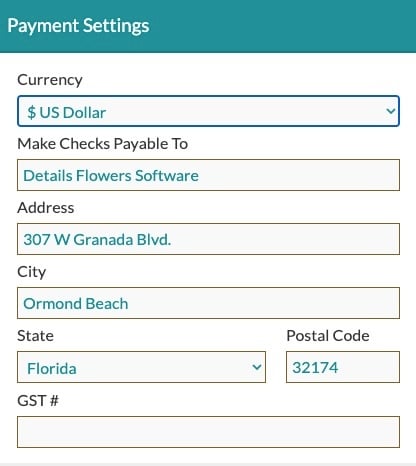
- Add your 'Make Checks Payable To' information, which will display on the 'Summary' page of your Proposal. If you do not accept checks as a form of payment, you can leave this section blank, and it will not appear on the Proposal.
#### **Set up your default payment schedule:**
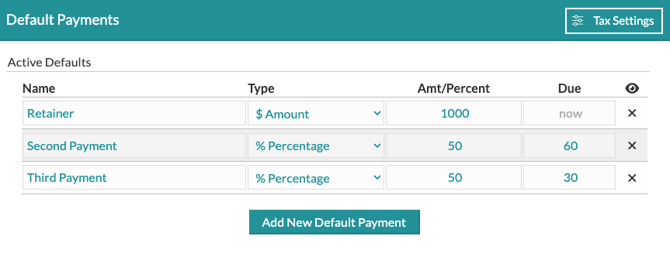
- Adjust the default schedule Details provides by clicking 'Add New Default Payment' to add additional payment rows or clicking 'X' to remove any rows you don’t wish to use.
- Adjust the rows to reflect how you would like to collect your payments. If using a flat dollar amount, select '$' under 'Type'
- If using a percentage, select “%” under 'Type.'
- Type in the percentage or dollar amount.
- Make sure that your percentages total 100% (*See photos below*)
- Under the 'Due' column, type in the number of days *before* the event that the payment is due. If left blank, the payment is due *now*.
- All percentages must equal 100%
#### **Set up Your Tax Settings:**
Located in the top right-hand corner of the 'Default Payments' section, you will find the 'Tax Settings' button. Here, you can choose how you would like your tax allocated for your account.
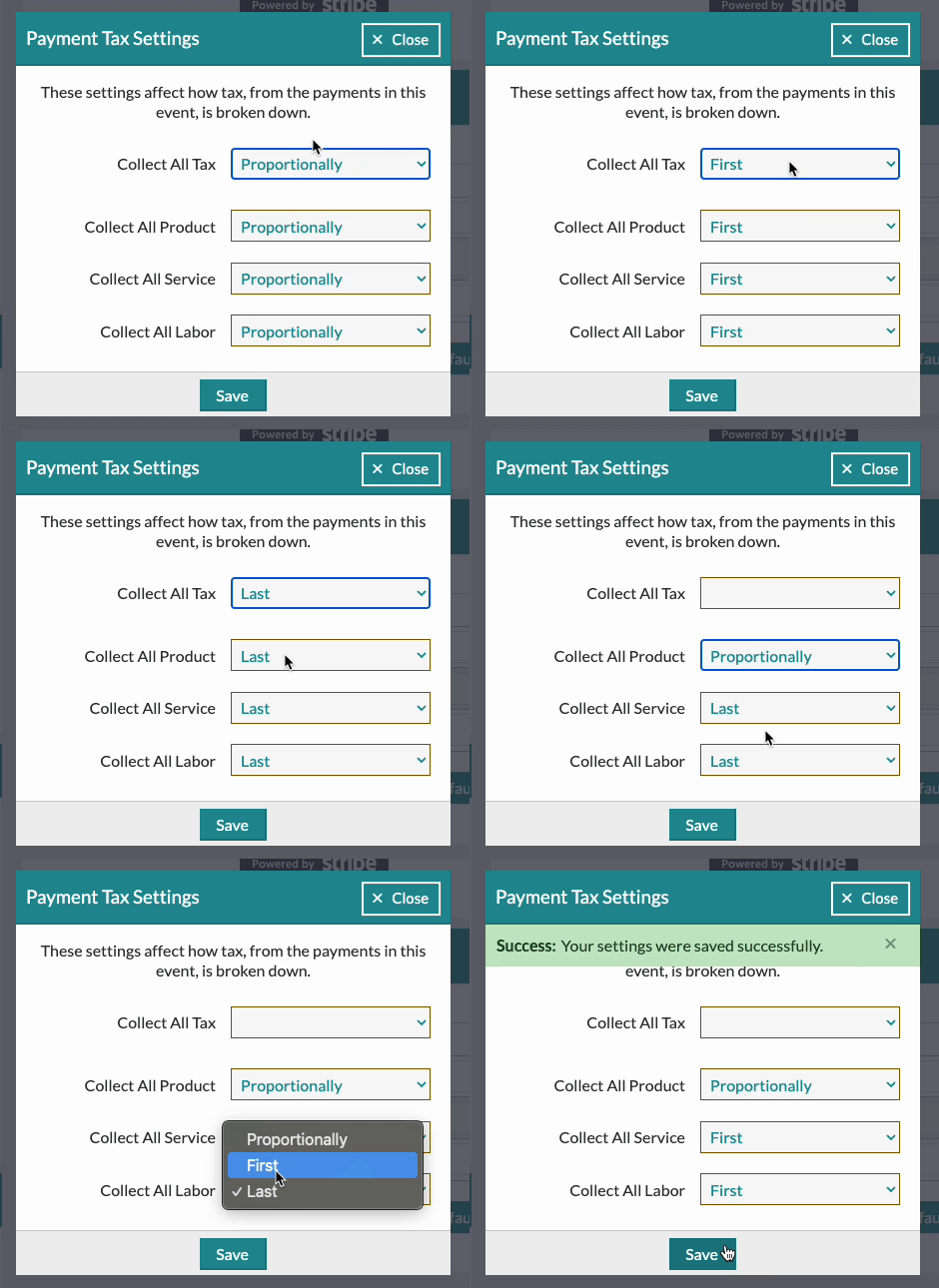
By default, taxes are allocated **proportionally**, dividing evenly across your payments based on their amounts. If you prefer, you can change this to collect all tax **first** or **last**. Additionally, you can set specific tax preferences for each category: **Product**, **Service**, and **Labor**
#### **Set Your Default Invoice Note**
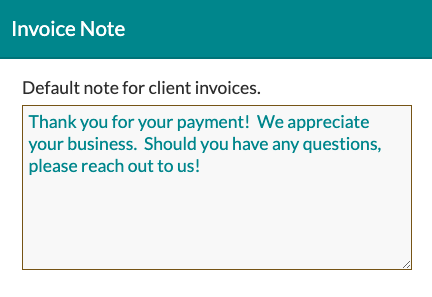
In the 'Invoice Note' section in the bottom left-hand corner, you can adjust the note that appears on your invoice. If you have something else you want to include specifically for certain clients, you can also adjust this on a per-event basis.
#### Connect With Stripe
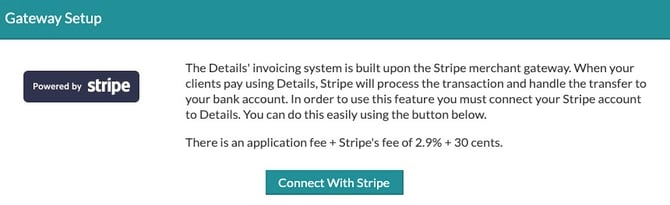
In the upper right-hand corner, you will also see an option to connect with Stripe if you are not already connected. This will allow you to utilize the Details Invoicing features, allowing your clients to process payments directly through the site.
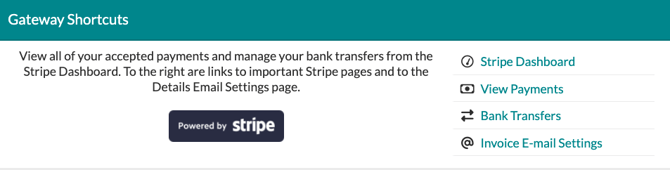
Once you are connected, you can access direct links to your Stripe account and invoice email settings in this area!
- [Getting Started With Details](https://support.detailsflowers.com/en/getting-started-with-details?hsLang=en#main-content)
- [Account Set Up](https://support.detailsflowers.com/en/getting-started-with-details?hsLang=en#account-set-up)
- [Education & Learning](https://support.detailsflowers.com/en/education-learning?hsLang=en#main-content)
- [Supporting Documents](https://support.detailsflowers.com/en/education-learning?hsLang=en#supporting-documents)
- [Event Financials/Invoicing](https://support.detailsflowers.com/en/education-learning?hsLang=en#event-financials-invoicing)
- [Event Details](https://support.detailsflowers.com/en/education-learning?hsLang=en#event-details)
- [Reports](https://support.detailsflowers.com/en/education-learning?hsLang=en#reports)
- [Form Builder](https://support.detailsflowers.com/en/education-learning?hsLang=en#form-builder)
- [Resource Galleries (Inspiration, Recipe, and Item)](https://support.detailsflowers.com/en/education-learning?hsLang=en#resource-galleries-inspiration-recipe-and-item)
- [The Proposal](https://support.detailsflowers.com/en/education-learning?hsLang=en#the-proposal)
- [Costs/RFQ](https://support.detailsflowers.com/en/education-learning?hsLang=en#costs-rfq)
- [The Event List](https://support.detailsflowers.com/en/education-learning?hsLang=en#the-event-list)
- [Client Information](https://support.detailsflowers.com/en/education-learning?hsLang=en#client-information)
- [The Design Board](https://support.detailsflowers.com/en/education-learning?hsLang=en#the-design-board)
- [Tools/Features](https://support.detailsflowers.com/en/education-learning?hsLang=en#tools-features)
- [The Design Worksheet & Recipes](https://support.detailsflowers.com/en/education-learning?hsLang=en#the-design-worksheet-recipes)
- [Company Settings](https://support.detailsflowers.com/en/education-learning?hsLang=en#company-settings)
- [Client Portal](https://support.detailsflowers.com/en/education-learning?hsLang=en#client-portal)
- [Emails](https://support.detailsflowers.com/en/emails?hsLang=en)
- [Details Direct](https://support.detailsflowers.com/en/details-direct?hsLang=en)
- [Account Information](https://support.detailsflowers.com/en/account-information?hsLang=en#main-content)
- [Analytics & Reports](https://support.detailsflowers.com/en/account-information?hsLang=en#analytics-reports)
- [Billing & Subscription](https://support.detailsflowers.com/en/account-information?hsLang=en#billing-subscription)
- [General Account Information](https://support.detailsflowers.com/en/account-information?hsLang=en#general-account-information)
- [Support](https://support.detailsflowers.com/en/account-information?hsLang=en#support)
- [Zapier](https://support.detailsflowers.com/en/zapier?hsLang=en#main-content)
- [Financials](https://support.detailsflowers.com/en/zapier?hsLang=en#financials)
- [About Zapier](https://support.detailsflowers.com/en/zapier?hsLang=en#about-zapier)
- [Project/Task Applications](https://support.detailsflowers.com/en/zapier?hsLang=en#project-task-applications)
- [Calendar Applications](https://support.detailsflowers.com/en/zapier?hsLang=en#calendar-applications)
- [Troubleshooting](https://support.detailsflowers.com/en/troubleshooting?hsLang=en#main-content)
- [The Worksheet](https://support.detailsflowers.com/en/troubleshooting?hsLang=en#the-worksheet)
- [Costs/RFQ/Orders](https://support.detailsflowers.com/en/troubleshooting?hsLang=en#costs-rfq-orders)
- [The Event List](https://support.detailsflowers.com/en/troubleshooting?hsLang=en#the-event-list)
- [Payments/Invoicing](https://support.detailsflowers.com/en/troubleshooting?hsLang=en#payments-invoicing)
- [General](https://support.detailsflowers.com/en/troubleshooting?hsLang=en#general)
- [The Proposal](https://support.detailsflowers.com/en/troubleshooting?hsLang=en#the-proposal)
- [The Resources](https://support.detailsflowers.com/en/troubleshooting?hsLang=en#the-resources)
- [Videos](https://support.detailsflowers.com/en/videos?hsLang=en#main-content)
- [Ordering & Invoicing](https://support.detailsflowers.com/en/videos?hsLang=en#ordering-invoicing)
- [Resource Galleries](https://support.detailsflowers.com/en/videos?hsLang=en#resource-galleries)
- [Creating Events](https://support.detailsflowers.com/en/videos?hsLang=en#creating-events)
- [Useful Features](https://support.detailsflowers.com/en/videos?hsLang=en#useful-features)
- About
- [Home](https://detailsflowers.com/)
- [Details Direct](https://info.detailsflowers.com/details-direct)
- [About Us](https://detailsflowers.com/about)
- [Features](https://info.detailsflowers.com/features)
- [Plans & Pricing](https://info.detailsflowers.com/plans)
- [Testimonials](https://info.detailsflowers.com/testimonials)
- [Press](https://info.detailsflowers.com/press)
- [Media](https://info.detailsflowers.com/media)
- Details University
- [Listen on Spotify](https://info.detailsflowers.com/masterclasses)
- [Classes](https://info.detailsflowers.com/details-university)
- [Demo](https://meetings.hubspot.com/details-flowers/demo)
- [FAQs](https://info.detailsflowers.com/faqs)
- [Careers](https://info.detailsflowers.com/careers-0)
- [Internships](https://info.detailsflowers.com/internships)
- Community
- [Blog](https://blog.detailsflowers.com/blog)
- [Our Partners](https://info.detailsflowers.com/partners)
- [Become a Partner](https://info.detailsflowers.com/become-a-partner)
- [Join Our FB Group](https://www.facebook.com/groups/detailsflowers/)
- Members
- [User Agreement](https://info.detailsflowers.com/user_agreement)
- [Privacy Policy](https://info.detailsflowers.com/privacy_policy)
- [Newsletter Sign Up](https://share.hsforms.com/11p2kVvqiRxSfZcPttN6mTw21epl)
- [Update Email Preferences](https://info.detailsflowers.com/resubscribe-to-important-updates)
[](https://info.detailsflowers.com/?hsLang=en)

**Details is a platform that helps florists and designers do more and earn more. Our software streamlines proposals, ensures clients are profitable down to each arrangement, and simplifies the payment process. Suppliers benefit too, with additional business from in-network florists, volume predictability, and greater customer loyalty.**
**[](https://www.facebook.com/detailsflowers) [](https://www.instagram.com/detailsflowers/) [](https://www.youtube.com/@Detailsflowers) [](https://www.linkedin.com/company/10633597/)[](https://www.tiktok.com/@details.flowers.software)**
- About
- [Home](https://detailsflowers.com)
- [Details Direct](https://info.detailsflowers.com/details-direct?hsLang=en)
- [About Us](https://detailsflowers.com/about)
- [Features](https://info.detailsflowers.com/features?hsLang=en)
- [Plans & Pricing](https://info.detailsflowers.com/plans?hsLang=en)
- [Testimonials](https://info.detailsflowers.com/testimonials?hsLang=en)
- [Press](https://info.detailsflowers.com/press?hsLang=en)
- [Media](https://info.detailsflowers.com/media?hsLang=en)
- Details University
- [Listen on Spotify](https://info.detailsflowers.com/masterclasses?hsLang=en)
- [Classes](https://info.detailsflowers.com/details-university?hsLang=en)
- [Demo](https://meetings.hubspot.com/details-flowers/demo)
- [FAQs](https://info.detailsflowers.com/faqs?hsLang=en)
- [Careers](https://info.detailsflowers.com/careers-0?hsLang=en)
- [Internships](https://info.detailsflowers.com/internships?hsLang=en)
- Community
- [Blog](https://blog.detailsflowers.com/blog?hsLang=en)
- [Our Partners](https://info.detailsflowers.com/partners?hsLang=en)
- [Become a Partner](https://info.detailsflowers.com/become-a-partner?hsLang=en)
- [Join Our FB Group](https://www.facebook.com/groups/detailsflowers/)
- Members
- [User Agreement](https://info.detailsflowers.com/user_agreement?hsLang=en)
- [Privacy Policy](https://info.detailsflowers.com/privacy_policy?hsLang=en)
- [Newsletter Sign Up](https://share.hsforms.com/11p2kVvqiRxSfZcPttN6mTw21epl)
- [Update Email Preferences](https://info.detailsflowers.com/resubscribe-to-important-updates?hsLang=en)
Contact Us
[hello@detailsflowers.com](mailto:hello@detailsflowers.com)
386.255.9594
307 W. Granada Blvd. Suite 2010
Ormond Beach, FL 32174
[Schedule An Intro Call](https://calendly.com/the-details-sales-team/introductory-call-15-minutes)