---
title: "Zapier: Adding a new client creates a new Google Drive folder"
description: When you add a new client to Details Flowers, Zapier will create a new folder for your client.
---
[Skip to content](https://support.detailsflowers.com/en/add-new-folder-to-google-drive-zapier#main-content)

- Details University
Show submenu for Details University
- [Video Tutorials](https://info.detailsflowers.com/video-tutorials)
- [15-Minute Meeting](https://meetings.hubspot.com/details-flowers/meet-with-details-support-free)
- [Details Check-In](https://meetings.hubspot.com/details-flowers/details-check-in-50)
- [Details University I](https://meetings.hubspot.com/details-flowers/details-university-i-50)
- [Details University II](https://meetings.hubspot.com/details-flowers/details-university-ii-75)
- [New Employee Orientation](https://meetings.hubspot.com/details-flowers/new-employee-orientation-50)
- Community
Show submenu for Community
- [Join Our FB Group](https://www.facebook.com/groups/detailsflowers)
- [\[Sign In\]](https://details.flowers/)
Open main navigation
Close main navigation
- Details University
Show submenu for Details University
- [Video Tutorials](https://info.detailsflowers.com/video-tutorials)
- [15-Minute Meeting](https://meetings.hubspot.com/details-flowers/meet-with-details-support-free)
- [Details Check-In](https://meetings.hubspot.com/details-flowers/details-check-in-50)
- [Details University I](https://meetings.hubspot.com/details-flowers/details-university-i-50)
- [Details University II](https://meetings.hubspot.com/details-flowers/details-university-ii-75)
- [New Employee Orientation](https://meetings.hubspot.com/details-flowers/new-employee-orientation-50)
- Community
Show submenu for Community
- [Join Our FB Group](https://www.facebook.com/groups/detailsflowers)
- [\[Sign In\]](https://details.flowers/)
- [Email Us](mailto:support@detailsflowers.com)
[Email Us](mailto:support@detailsflowers.com)
Welcome to the Details Knowledge Base! How can we help you?
- There are no suggestions because the search field is empty.
1. [Details Flowers Knowledge Base](https://support.detailsflowers.com/en?hsLang=en)
2. [Zapier](https://support.detailsflowers.com/en/zapier?hsLang=en)
3. [Project/Task Applications](https://support.detailsflowers.com/en/zapier?hsLang=en#project-task-applications)
# Zapier: Adding a new client creates a new Google Drive folder
## When you add a new client to Details Flowers, Zapier will create a new folder for your client.
This will give you a place online to upload and store relevant files for your client. Think inspiration, proposals, and more!
***Note**: This is not retroactive and will only apply to events you created after implementing this Zap.*
#### Trigger
- First, click the 'Make a Zap' button.
- In the search bar, type in 'Details Flowers' and select.
- Click 'New Client' and then 'Save + Continue'
- If you have not already connected your Details account, click here to learn how. Otherwise, it will pull up your Details account - click 'Save + Continue'
- Pick a sample for the next step - it *does not* need to be a current event. Click 'Continue'
- *Note: You can pull more samples if you like.*
#### Action
- Click the blue link asking you to add an Action.
- Search for and click 'Google Drive'
- Select 'Create Folder'
- Connect your Google Drive (if needed) and click 'Save + Continue'
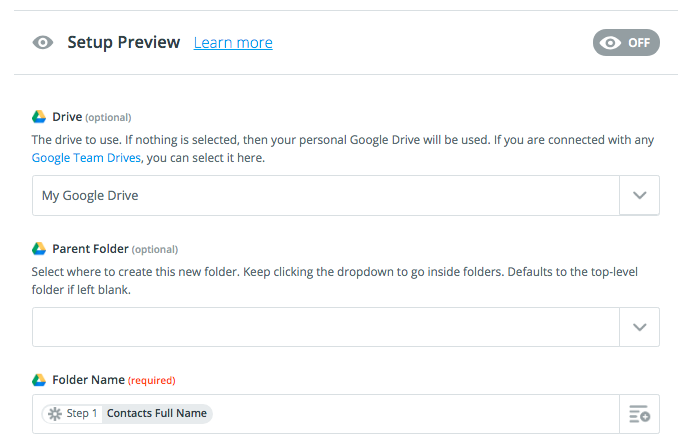
- Next, you'll fill in the required fields to finish up the Zap. Click within the 'Google Drive' box and find 'My Google Drive'
- *Optional:* Pick a parent folder.
- Click in the 'Folder Name' box and select what you would like it to be called. We suggest using 'Contacts Full Name'
- Click 'Continue'.
#### Finishing Up:
- Once the above is completed, you'll be asked to send a test. Click 'Send Test To Google Drive'
- A bar will pop up letting you know if the test was successful or not. If successful, click 'Finish'
- Name your Zap and then click the switch to turn it on.
**[Check out the Zapier Learning Center!](https://zapier.com/learn/)**
- [Getting Started With Details](https://support.detailsflowers.com/en/getting-started-with-details?hsLang=en#main-content)
- [Account Set Up](https://support.detailsflowers.com/en/getting-started-with-details?hsLang=en#account-set-up)
- [Education & Learning](https://support.detailsflowers.com/en/education-learning?hsLang=en#main-content)
- [Supporting Documents](https://support.detailsflowers.com/en/education-learning?hsLang=en#supporting-documents)
- [Event Financials/Invoicing](https://support.detailsflowers.com/en/education-learning?hsLang=en#event-financials-invoicing)
- [Event Details](https://support.detailsflowers.com/en/education-learning?hsLang=en#event-details)
- [Reports](https://support.detailsflowers.com/en/education-learning?hsLang=en#reports)
- [Form Builder](https://support.detailsflowers.com/en/education-learning?hsLang=en#form-builder)
- [Resource Galleries (Inspiration, Recipe, and Item)](https://support.detailsflowers.com/en/education-learning?hsLang=en#resource-galleries-inspiration-recipe-and-item)
- [The Proposal](https://support.detailsflowers.com/en/education-learning?hsLang=en#the-proposal)
- [Costs/RFQ](https://support.detailsflowers.com/en/education-learning?hsLang=en#costs-rfq)
- [The Event List](https://support.detailsflowers.com/en/education-learning?hsLang=en#the-event-list)
- [Client Information](https://support.detailsflowers.com/en/education-learning?hsLang=en#client-information)
- [The Design Board](https://support.detailsflowers.com/en/education-learning?hsLang=en#the-design-board)
- [Tools/Features](https://support.detailsflowers.com/en/education-learning?hsLang=en#tools-features)
- [The Design Worksheet & Recipes](https://support.detailsflowers.com/en/education-learning?hsLang=en#the-design-worksheet-recipes)
- [Company Settings](https://support.detailsflowers.com/en/education-learning?hsLang=en#company-settings)
- [Client Portal](https://support.detailsflowers.com/en/education-learning?hsLang=en#client-portal)
- [Emails](https://support.detailsflowers.com/en/emails?hsLang=en)
- [Details Direct](https://support.detailsflowers.com/en/details-direct?hsLang=en)
- [Account Information](https://support.detailsflowers.com/en/account-information?hsLang=en#main-content)
- [Analytics & Reports](https://support.detailsflowers.com/en/account-information?hsLang=en#analytics-reports)
- [Billing & Subscription](https://support.detailsflowers.com/en/account-information?hsLang=en#billing-subscription)
- [General Account Information](https://support.detailsflowers.com/en/account-information?hsLang=en#general-account-information)
- [Support](https://support.detailsflowers.com/en/account-information?hsLang=en#support)
- [Zapier](https://support.detailsflowers.com/en/zapier?hsLang=en#main-content)
- [Financials](https://support.detailsflowers.com/en/zapier?hsLang=en#financials)
- [About Zapier](https://support.detailsflowers.com/en/zapier?hsLang=en#about-zapier)
- [Project/Task Applications](https://support.detailsflowers.com/en/zapier?hsLang=en#project-task-applications)
- [Calendar Applications](https://support.detailsflowers.com/en/zapier?hsLang=en#calendar-applications)
- [Troubleshooting](https://support.detailsflowers.com/en/troubleshooting?hsLang=en#main-content)
- [The Worksheet](https://support.detailsflowers.com/en/troubleshooting?hsLang=en#the-worksheet)
- [Costs/RFQ/Orders](https://support.detailsflowers.com/en/troubleshooting?hsLang=en#costs-rfq-orders)
- [The Event List](https://support.detailsflowers.com/en/troubleshooting?hsLang=en#the-event-list)
- [Payments/Invoicing](https://support.detailsflowers.com/en/troubleshooting?hsLang=en#payments-invoicing)
- [General](https://support.detailsflowers.com/en/troubleshooting?hsLang=en#general)
- [The Proposal](https://support.detailsflowers.com/en/troubleshooting?hsLang=en#the-proposal)
- [The Resources](https://support.detailsflowers.com/en/troubleshooting?hsLang=en#the-resources)
- [Videos](https://support.detailsflowers.com/en/videos?hsLang=en#main-content)
- [Ordering & Invoicing](https://support.detailsflowers.com/en/videos?hsLang=en#ordering-invoicing)
- [Resource Galleries](https://support.detailsflowers.com/en/videos?hsLang=en#resource-galleries)
- [Creating Events](https://support.detailsflowers.com/en/videos?hsLang=en#creating-events)
- [Useful Features](https://support.detailsflowers.com/en/videos?hsLang=en#useful-features)
- About
- [Home](https://detailsflowers.com/)
- [Details Direct](https://info.detailsflowers.com/details-direct)
- [About Us](https://detailsflowers.com/about)
- [Features](https://info.detailsflowers.com/features)
- [Plans & Pricing](https://info.detailsflowers.com/plans)
- [Testimonials](https://info.detailsflowers.com/testimonials)
- [Press](https://info.detailsflowers.com/press)
- [Media](https://info.detailsflowers.com/media)
- Details University
- [Listen on Spotify](https://info.detailsflowers.com/masterclasses)
- [Classes](https://info.detailsflowers.com/details-university)
- [Demo](https://meetings.hubspot.com/details-flowers/demo)
- [FAQs](https://info.detailsflowers.com/faqs)
- [Careers](https://info.detailsflowers.com/careers-0)
- [Internships](https://info.detailsflowers.com/internships)
- Community
- [Blog](https://blog.detailsflowers.com/blog)
- [Our Partners](https://info.detailsflowers.com/partners)
- [Become a Partner](https://info.detailsflowers.com/become-a-partner)
- [Join Our FB Group](https://www.facebook.com/groups/detailsflowers/)
- Members
- [User Agreement](https://info.detailsflowers.com/user_agreement)
- [Privacy Policy](https://info.detailsflowers.com/privacy_policy)
- [Newsletter Sign Up](https://share.hsforms.com/11p2kVvqiRxSfZcPttN6mTw21epl)
- [Update Email Preferences](https://info.detailsflowers.com/resubscribe-to-important-updates)
[](https://info.detailsflowers.com/?hsLang=en)

**Details is a platform that helps florists and designers do more and earn more. Our software streamlines proposals, ensures clients are profitable down to each arrangement, and simplifies the payment process. Suppliers benefit too, with additional business from in-network florists, volume predictability, and greater customer loyalty.**
**[](https://www.facebook.com/detailsflowers) [](https://www.instagram.com/detailsflowers/) [](https://www.youtube.com/@Detailsflowers) [](https://www.linkedin.com/company/10633597/)[](https://www.tiktok.com/@details.flowers.software)**
- About
- [Home](https://detailsflowers.com)
- [Details Direct](https://info.detailsflowers.com/details-direct?hsLang=en)
- [About Us](https://detailsflowers.com/about)
- [Features](https://info.detailsflowers.com/features?hsLang=en)
- [Plans & Pricing](https://info.detailsflowers.com/plans?hsLang=en)
- [Testimonials](https://info.detailsflowers.com/testimonials?hsLang=en)
- [Press](https://info.detailsflowers.com/press?hsLang=en)
- [Media](https://info.detailsflowers.com/media?hsLang=en)
- Details University
- [Listen on Spotify](https://info.detailsflowers.com/masterclasses?hsLang=en)
- [Classes](https://info.detailsflowers.com/details-university?hsLang=en)
- [Demo](https://meetings.hubspot.com/details-flowers/demo)
- [FAQs](https://info.detailsflowers.com/faqs?hsLang=en)
- [Careers](https://info.detailsflowers.com/careers-0?hsLang=en)
- [Internships](https://info.detailsflowers.com/internships?hsLang=en)
- Community
- [Blog](https://blog.detailsflowers.com/blog?hsLang=en)
- [Our Partners](https://info.detailsflowers.com/partners?hsLang=en)
- [Become a Partner](https://info.detailsflowers.com/become-a-partner?hsLang=en)
- [Join Our FB Group](https://www.facebook.com/groups/detailsflowers/)
- Members
- [User Agreement](https://info.detailsflowers.com/user_agreement?hsLang=en)
- [Privacy Policy](https://info.detailsflowers.com/privacy_policy?hsLang=en)
- [Newsletter Sign Up](https://share.hsforms.com/11p2kVvqiRxSfZcPttN6mTw21epl)
- [Update Email Preferences](https://info.detailsflowers.com/resubscribe-to-important-updates?hsLang=en)
Contact Us
[hello@detailsflowers.com](mailto:hello@detailsflowers.com)
386.255.9594
307 W. Granada Blvd. Suite 2010
Ormond Beach, FL 32174
[Schedule An Intro Call](https://calendly.com/the-details-sales-team/introductory-call-15-minutes)
```json
{
"@context" : "https://schema.org",
"@type" : "VideoObject",
"contentUrl" : "https://3424953.fs1.hubspotusercontent-na1.net/hubfs/3424953/New%20Google%20Folder%20-%20Zapier.mov",
"dateModified" : "2022-05-26T14:18:13.996Z",
"duration" : "PT1M25S",
"height" : 750,
"name" : "New Google Folder - Zapier",
"thumbnailUrl" : "https://3424953.fs1.hubspotusercontent-na1.net/hubfs/3424953/New%20Google%20Folder%20-%20Zapier.mov/medium.jpg",
"uploadDate" : "2019-03-07T21:26:03.816Z",
"width" : 1424
}
```